HTML DOM (Document Object Model)
When a web page is loaded, the browser creates a Document Object Model of the page. The HTML DOM model is constructed as a tree of Objects
With the object model, JavaScript gets all the power it needs to create dynamic HTML:
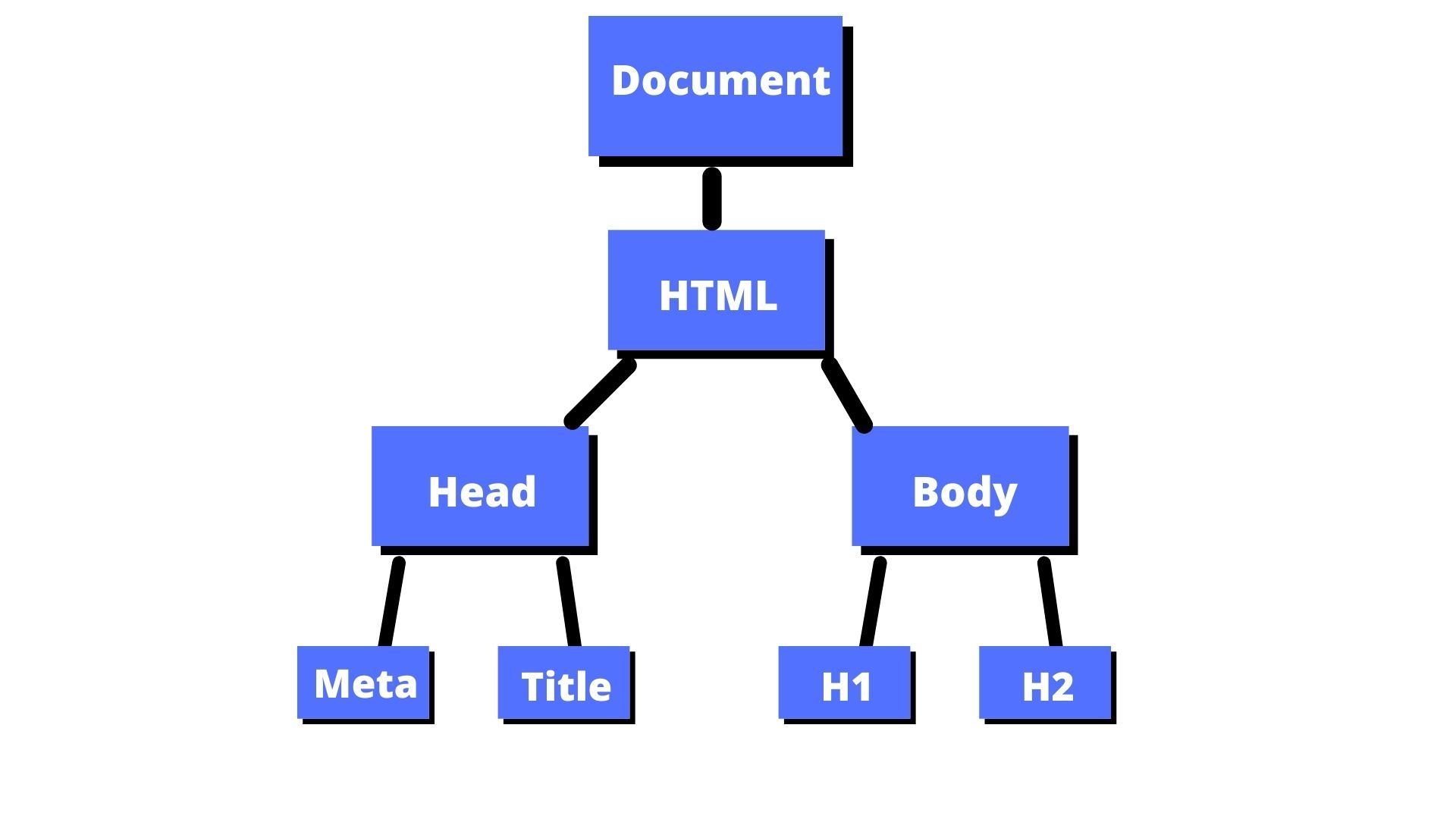
DOM : (1). Element node (2). Text node (3). attribute node
- JavaScript can change all the HTML elements in the page
- JavaScript can change all the CSS styles in the page
- JavaScript can remove existing HTML elements and attributes
- JavaScript can add new HTML elements and attributes
- JavaScript can react to all existing HTML events in the page
- JavaScript can create new HTML events in the page
• JS Targeting Methods with the help of document object!!!
var element;
                element = document.all;
                element = document.head;
                element = document.title;
                element = document.body;
                element = document.links;
                element = document.links[0];
                element = document.images;
                element = document.forms;
                element = document.doctype;
                element = document.URL;
                element = document.baseURI;
                element = document .getElementById("header");
                element = document .getElementsByClassName("list");
                element = document .getElementsByClassName("list")[0]
                element = document .getElementsByTagName("ul");
                element = document .getElementsByTagName("ul")[2]
                console.log(element);
• JS DOM Targeting Methods
| Methods | Description |
|---|---|
| document.getElimentById() | Select the unique element with given id. In case there are 2 same ID then it selects the first element. |
| document.getElementsByClassName() | Select collection elements with given classname |
| document.getElimentsByTagName() | Select collection elements with given tagname |
JS DOM Get & Set Value Methods
| Get method | Set method |
|---|---|
| innerHTML | innerHTML="<h1>Set text with html</h1>" |
| innerText | innerText="Set text" |
| getAttribute() | setAttribute("class","xyz") |
| getAttributeNode() | attributes[0].value="xyz" |
| attributes | removeAttribute("class") |
Practice with DOM Manipulating Methods
                element = document .getElementById("id_name") .innerText;
                element = document .getElementById("id_name") .innerText;
                element = document .getElementById("id_name") .getAttribute("class");
                element = document .getElementById("id_name") .getAttribute("style");
                element = document .getElementById("id_name") .getAttributeNode("style") .value;
                element = document .getElementById("id_name") .attributes;
                element = document .getElementById("id_name") .attributes[2].name;
                element = document .getElementById("header") .getAttribute("onClick");
                element = document .getElementById("header") .getAttribute("class");
                element = document .getElementById("header") .getAttributeNode("style");

                element = document .getElementById("header") .setAttribute("style","border:10px dotted yellow");
                element = document .getElementById("header") .attributes[1].value = "xyz";
                element = document .getElementById("header") .removeAttribute("style");
                element = document .getElementById("header") .removeAttribute("class");
console.log(element);
JS DOM QuerySelectors
                    (1). document.querySelector("#idName")


                    (2). document.querySelectorAll(".className")


                    Advanced selector :- document.querySelector("#idName h1")
                var element;

                element = document.querySelector("#header").getAttribute ("class");
                element = document.querySelectorAll(".list");
                element = document.querySelectorAll(".list")[1].innerHTML;
                element = document.querySelectorAll("ul");
                element = document.querySelectorAll("ul")[1].innerHTML;
                element = document.querySelectorAll("#header h1");
                element = document.querySelectorAll("#header h1")[1].innerHTML;

                console.log(element);
CSS BY JS DOM (Styling Methods)
Styling with 3-way...
(1). Style object (style attribute).
(2). ClassName object (class attribute).
(3). classList :- It has two method are following...
(i). Add method (ii).
Remove method classList
(target.classList .add("abc",xyz));
(target.classList .remove("abc",xyz));
                var element;
                element = document.querySelector("#header").style.border;
                element = document.querySelector("#header").style.color;
                document.querySelector("#header").style.backgroundColor = "red";
                document.querySelector("#header").style.color = "blue";
                document.querySelector("#header").className = "abc xyz";
                element = document.querySelector("#header").className;
                document.querySelector("#header").classList = "abc xyz";
                element = document.querySelector("#header").classList;
                document.querySelector("#header").classList.add("xyz","efg");
                document.querySelector("#header").classList.remove("xyz");
                element = document.querySelector("#header").classList;

                console.log(element);
JS classList Methods
The classList property is used for representing the value of the class elements which is a DOMTokenList object. It is a read-only property but we can modify its value by manipulating the classes used in the program. The JavaScript classList property consists of following methods through which we can perform different operations on the class elements:- add(): The add() method is used for adding one or more classes to the element.
- remove(): The remove() method is used for removing one or more classes from the number of classes present in the element.
- toggle(): The toggle() method is used for toggling the specified class names of an element. It means on one click the specified class gets added and on another click the class gets removed. It is known as the toggle property of an element.
- replace(): The replace() method is used for replacing an existing class with a new class.
- contains(): The contains() method of the JavaScript classList property is used for returning the Boolean value as an output. If the class is present, the value is returned as true otherwise false is returned.
- item(): The item() method is used for displaying the name of the classes at the particular index. Thus, it returns the class name.
Example :-
                document.getElementById("header").addEventListener("click", abc);

                function abc() {

                         document.getElementById("header").classList.add("xyz","efg");


                         //document.getElementById("header").classList.remove("xyz");


                         //var a = document.getElementById("header").classList.length;


                         //document.getElementById("header").classList.toggle("xyz");


                         //var a = document.getElementById("header").classList;


                         //var a = document.getElementById("header").classList.item(0);


                         //var a = document.getElementById("header").classList.contains("first");


                         console.log(a);

                }
AddEventListener Method
Assign event using the DOM.
            1.  onclick event // When i click header change background.
                document.getElementById("header").onclick = abc;

            2.  onmouseenter event
                document.getElementById("header").onmouseenter = abc;

                function abc(){
                document.getElementById("header").style.background="lightblue"
                }
Add EventListener / Remove EventListene
- add EventListener("eventName", funcName, capture)
- eventName : click, bdlclick, mouseenter...
- funcName : abc, xyz...
-
Capture : optional parameter by default false. (true/false).
- true :- outer than inner div call. (capturing phase)
- false :- inner than ourer div call. (bubbling phase)
with addEventListener
                    document.getElementById("header").addEventListener("mouseenter",abc);

                    OR

                    document.getElementById("header").addEventListener("click", function(){

                    document.getElementById("header").style.backgroundColor = "green";

                    });
with remove EventListene
                1. document.getElementById("header").removeEventListener('mouseleave',abc);
                2. document.getElementById("header").addEventListener("click",xyz);

                    <p id="demo">I am <br> Background </p >


                    <button onclick="removeHandler()">Remove</button>


                    const myHead = document.getElementById("header");


                    myHead.addEventListener("mousemove", myFunction);


                    function removeFunction() {

                    myHead.removeEventListener("mousemove", myFunction);

                    }


                    function myFunction() {

                    document.getElementById("demo").style.background = `#${Math.ceil(Math.random()*1000000)}`

                    }
DOM Transversal method
DOM traversal is a fundamental concept in JavaScript for web development. It involves navigating and manipulating the Document Object Model (DOM), which represents the structured hierarchy of elements in an HTML document.
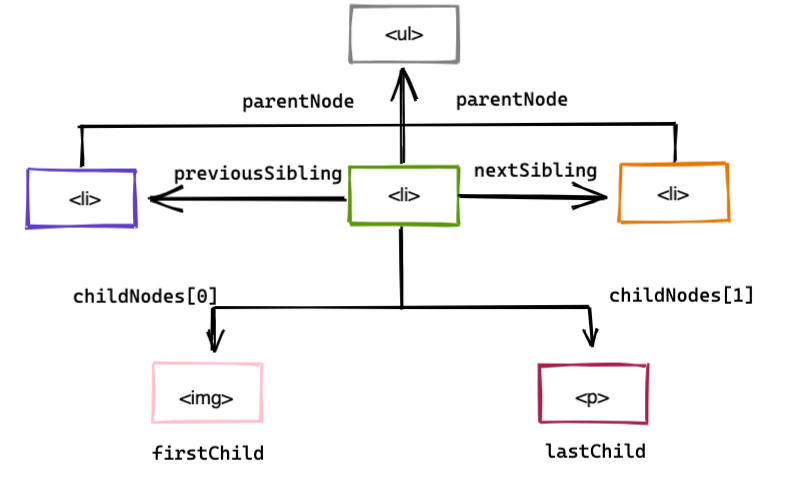
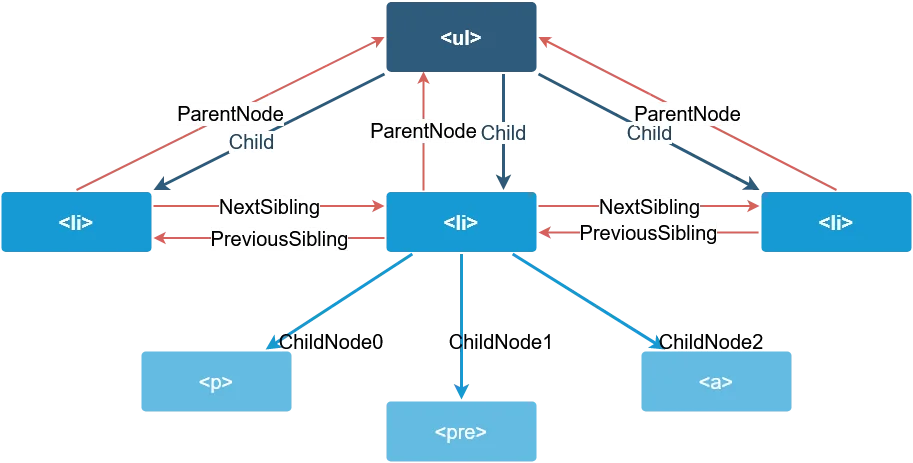
- parentNode
- parentElement
- childNodes
- children
- firstChild
- firstElementChild
- lastChild
- lastElementChild
- nextSibling
- nextElementSibling
- previousSibling
- previousElementSibling
JS Parent Method
The parentNode property returns the parent node of an element or node.
The parentNode property is read-only.
parentElement:
The parentElement property returns the parent element of the specified element.
The difference between parentElement and parentNode, is that parentElement returns null if the parent node is not an element node:
                    //var a = document.getElementById("inner").parentElement;


                    //var a = document.getElementById("outer").parentElement;


                    //var a = document.body.parentElement;


                    //var a = document.getElementById("inner").parentElement.style.background = "red";


                    /* document.getElementById("child-c").parentElement.style.background = "red";


                    var a = document.getElementById("child-c").parentElement; */


                    document.getElementById("child-c").parentElement.style.background = "red";


                    var a = document.getElementById("main").parentNode;


                    console.log(a);
JS Children Methods
                //var a = document.getElementById("outer").children;


                //var a = document.getElementById("inner").children;


                //var a = document.getElementById("inner").children[1];


                /* document.getElementById("inner").children[1].style.background = "red";


                var a = document.getElementById("inner").children[1]; */


                /* document.getElementById("inner").children[0].style.background = "red";


                var a = document.getElementById("inner").children[0].innerHTML; */


                //var a = document.getElementById("inner").childNodes;


                //var a = document.getElementById("inner").childNodes[0].innerHTML;


                document.getElementById("inner").childNodes[3].style.background = "red";


                var a = document.getElementById("inner").childNodes[3];


                console.log(a);
JS FirstChild & LastChild Method
                //var a = document.getElementById("inner").firstElementChild;


                //var a = document.getElementById("inner").firstElementChild.innerHTML;


                /* document.getElementById("inner").firstElementChild.style.background = "red";


                var a = document.getElementById("inner").firstElementChild.innerHTML; */


                /* document.getElementById("outer").lastElementChild.style.background = "red";


                var a = document.getElementById("outer").lastElementChild; */


                /* document.getElementById("inner").lastElementChild.style.background = "red";


                var a = document.getElementById("inner").lastElementChild; */


                //var a = document.getElementById("inner").firstChild;


                //var a = document.getElementById("inner").lastChild;


                //var a = document.getElementById("child-c").firstChild;


                var a = document.getElementById("child-c").lastChild;


                console.log(a);
JS NextSibling & PrevSibling Method
                //var a = document.getElementById("child-C").nextElementSibling;


                //var a = document.getElementById("child-C").previousElementSibling;


                //var a = document.getElementById("child-C").previousElementSibling.innerHTML ;


                /* document.getElementById("child-C").previousElementSibling.style.background = "red";


                var a = document.getElementById("child-C").previousElementSibling.innerHTML; */


                /* document.getElementById("child-C").nextElementSibling.style.background = "red";


                var a = document.getElementById("child-C").nextElementSibling; */


                //var a = document.getElementById("child-E").nextElementSibling;


                //var a = document.getElementById("child-head").previousElementSibling;


                //var a = document.getElementById("child-C").previousSibling;


                var a = document.getElementById("child-C").nextSibling;


                console.log(a);
JS Create & TextNode
• (1). CreateElement("p").
• (2). CreateTextNode("This is text").
• (3). CreateComment("This is comment").
                var newTag = document.createElement("p");


                var newText = document.createElement("h2");


                console.log(newElement);


                var newText = document.createTextNode("This is just text");


                console.log(newText);


                /* Dom Create Comment*/


                var newComment = document.createComment("this is comment");


                console.log(newComment);
JS AppendChild & InsertBefore
The appendChild() method appends a node (element) as the last child of an element.
syntex {
element.appendChild(node)
or
node.appendChild(node) }
The insertBefore() method inserts a child node before an existing child.
syntex {
element.insertBefore(new, existing)
or
node.insertBefore(new, existing) }
                /* Dom Create */


                //var newElement = document.createElement("p");


                var newElement = document.createElement("h2");


                console.log(newElement);


                var newText = document.createTextNode("This is just text");


                console.log(newText);


                /* JavaScript AppendChild*/


                newElement.appendChild(newText);


                //document.getElementById("test").appendChild(newElement);


                /* JavaScript InsertBefore */


                var target = document.getElementById("test");


                target.insertBefore(newElement,target.childNodes[0])
JavaScript insert Adjacent Element() and insert Adjacent HTML() and insert Adjacent Text()
| Value (position) | Description |
|---|---|
| afterbegin | After the beginning of the element (first child) |
| afterend | After the element |
| beforebegin | Before the element |
| beforeend | Before the end of the element (last child) |
insert AdjacentElement()
The insert Adjacent Element("afterend", new) method inserts a an element into a specified position.
                syntex :-

                target.insertAdjacentElement(position, element)

                or

                node.insertAdjacentElement(position, element)


                // insertAdjacentElement Method


                var newElement = document.createElement("h2");


                var newText = document.createTextNode("This is just element");


                newElement.appendChild(newText);


                var target = document.getElementById("test");


                target.insertAdjacentElement("afterbegin",newElement);
insert AdjacentHTML()
The insert AdjacentHTML("afterend", new) method inserts HTML code into a specified position.
                    syntex : -

                target.insertAdjacentHTML(position, html)

                or

                node.insertAdjacentHTML(position, html)


                // insertAdjacentHTML Method


                var newElement ="<h2>This is just Html</h2>";


                var target = document.getElementById("test");


                target.insertAdjacentHTML("afterend",newElement);
insert Adjacent Text("afterend", new) Method
                var newText = "This is just Text";


                var target = document.getElementById("test");


                target.insertAdjacentHTML("beforeend",newText);
JS ReplaceChild & RemoveChild
The replaceChild() method replaces a child node with a new node.
syntex : - node .replaceChild(newnode, oldnode)
/*JavaScript ReplaceChild*/
                /*var newElement = document.createElement("li");


                var newText = document.createTextNode("WOW new Text");


                newElement.appendChild(newText);


                var target = document.getElementById("list");


                var oldElement = target.children[0];*/


                //console.log(oldElement);


                //target.replaceChild(newElement,oldElement);


                /*JavaScript RemoveChild*/


                var target = document.getElementById("list");


                var oldElement = target.children[1];
JS cloneNode
The cloneNode() method creates a copy of a node, and returns the clone.The cloneNode() method clones all attributes and their values.
Syntex : -
node.cloneNode(deep);
                    var target = document.getElementById("list1").children[0];


                    var copyElement = target.cloneNode(true);


                    console.log(copyElement);


                    document.getElementById("list2").appendChild(copyElement);


                    document.getElementById("test").appendChild(copyElement);
JS Contains
The contains() method returns true if a node is a descendant of a node.The contains() method returns false if not.
Syntex : -
node.contains(node)
                    var parentElement = document.getElementById("test");


                    var target = document.getElementById("abc");


                    var find = parentElement.contains(target);


                    console.log(find);
1. The hasAttribute() method returns true if the attribute exists, otherwise false.
2. The hasChildNodes() method returns true if the specified node has any child nodes, otherwise false.
The
hasChildNodes() method is read-only.
                /* JavaScript hasAttribute*/


                var target = document.getElementById("test");


                var find = target.hasAttribute("class");


                console.log(find);


                /* JavaScript hasChildNodes*/


                var target = document.getElementById("test");


                var find = target.hasChildNodes();


                console.log(find);
JS IsEqualNode
Syntex : - element.isEqualNode(node)
or
node.isEqualNode(node);
                    var target1 = document.getElementById("list-1").firstElementChild;


                    var target2 = document.getElementById("list-2").children[1];


                    var equal = target1.isEqualNode(target2);


                     console.log(equal);